


Passport Parking

Park with Confidence.

Enhancing zone search experience
iPhone mockup

PROJECT OVERVIEW

Integration icon

Duration

4 weeks
Integration icon

Tools

Figma
Whimsical
Miro
Excel
Integration icon

Type

Add a Feature
Integration icon

Focus

Lifestyle/Travel
Integration icon

Role

UI/UX Designer
Project Background

Passport Parking

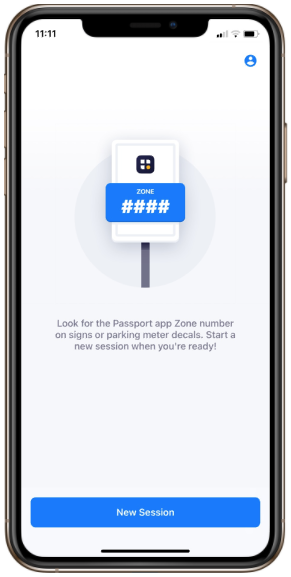
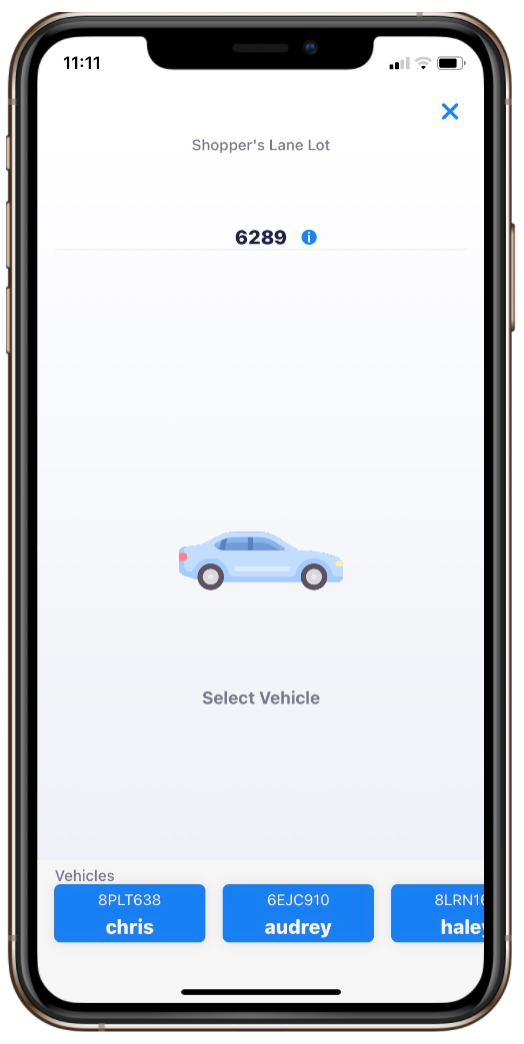
Passport Parking was established in 2022 by Passport Labs, Inc. The primary purpose of this app is to allow users to pay for parking easily and efficiently. The app allows users to input the license plate and street parking zone to make the payment. This provides convenience because it eliminates the need to dig for coins and find a meter to park at. The parking zone amount is already programmed into the app, which allows users to select freely on the amount of time they want to pay for. In addition, user can extend their session and add payment directly from the app instead of having to walk back to add payment into a meter.

SCOPE OF WORK AND RESPONSIBILITY

Research

I conducted competitive analysis to understand features that exists and created provisional personas to target user problems.

Ideate

After gathering information, I ideated a solution and produced interaction designs to visualize the flow.

UI Design

I incorporated icons and visuals that are pertinent within the existing design to enhance cohesivity.

Test

The prototype was created to showcase the solution followed by usability study to refine and strengthen the prototype.

Research

Competitive Analysis

What is on the market?

Before diving into creating the elements and functionalities of the application, I conducted a competitive analysis of what the market is offering. Below are 4 different applications that offer the service of convenience in finding a parking spot prior to arrival. Upon completing the research of options available, there are characteristics that I envisioned as opportunities for my application.
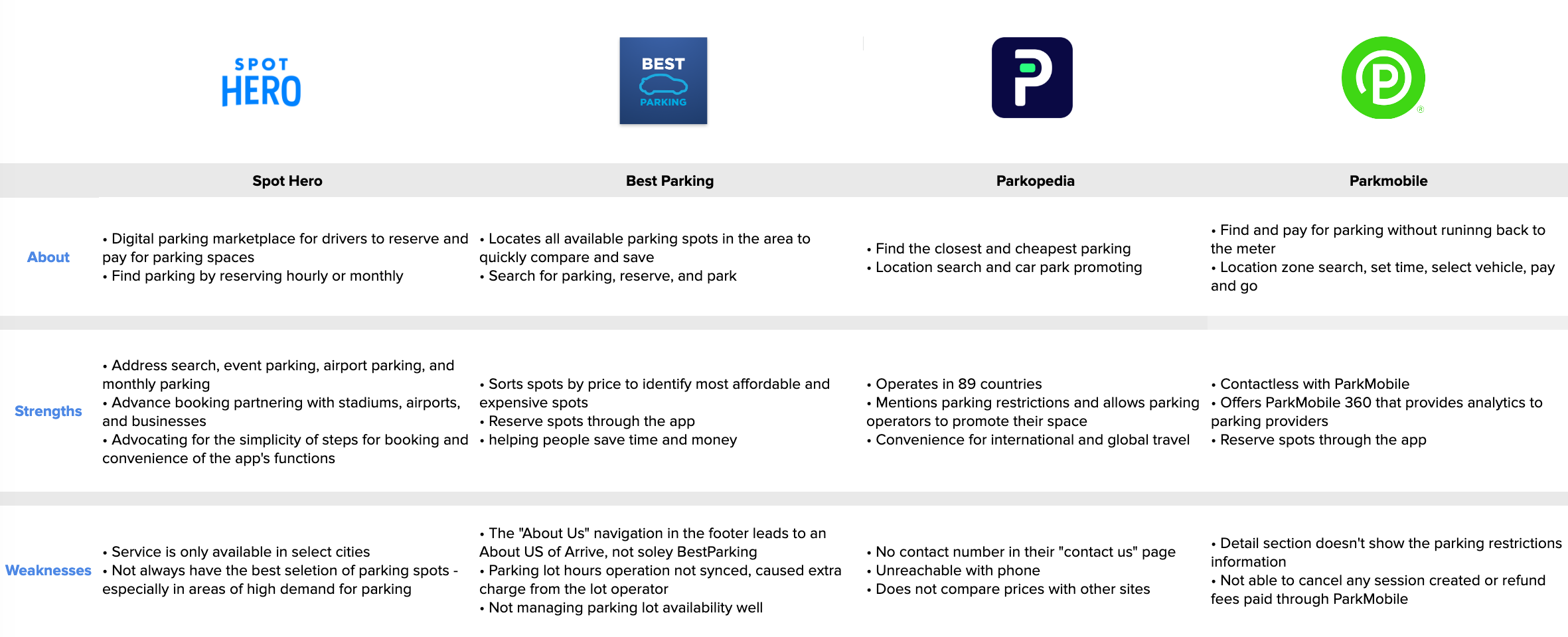
Highlights & Opportunities

  • Display parking map to help users visually identify parking spots are
  • Offer filter search for types of parking
  • Parking details
Users

Provisional Personas

The personas created are focused on people from dense metropolitan cities who will highly likely encounter parking inconveniences often or daily. In both Los Angeles and San Francisco, finding parking in some areas can be overly stressful. Let's take a look into Tina and Chris' lives to visualize the significant role parking plays in their lives.
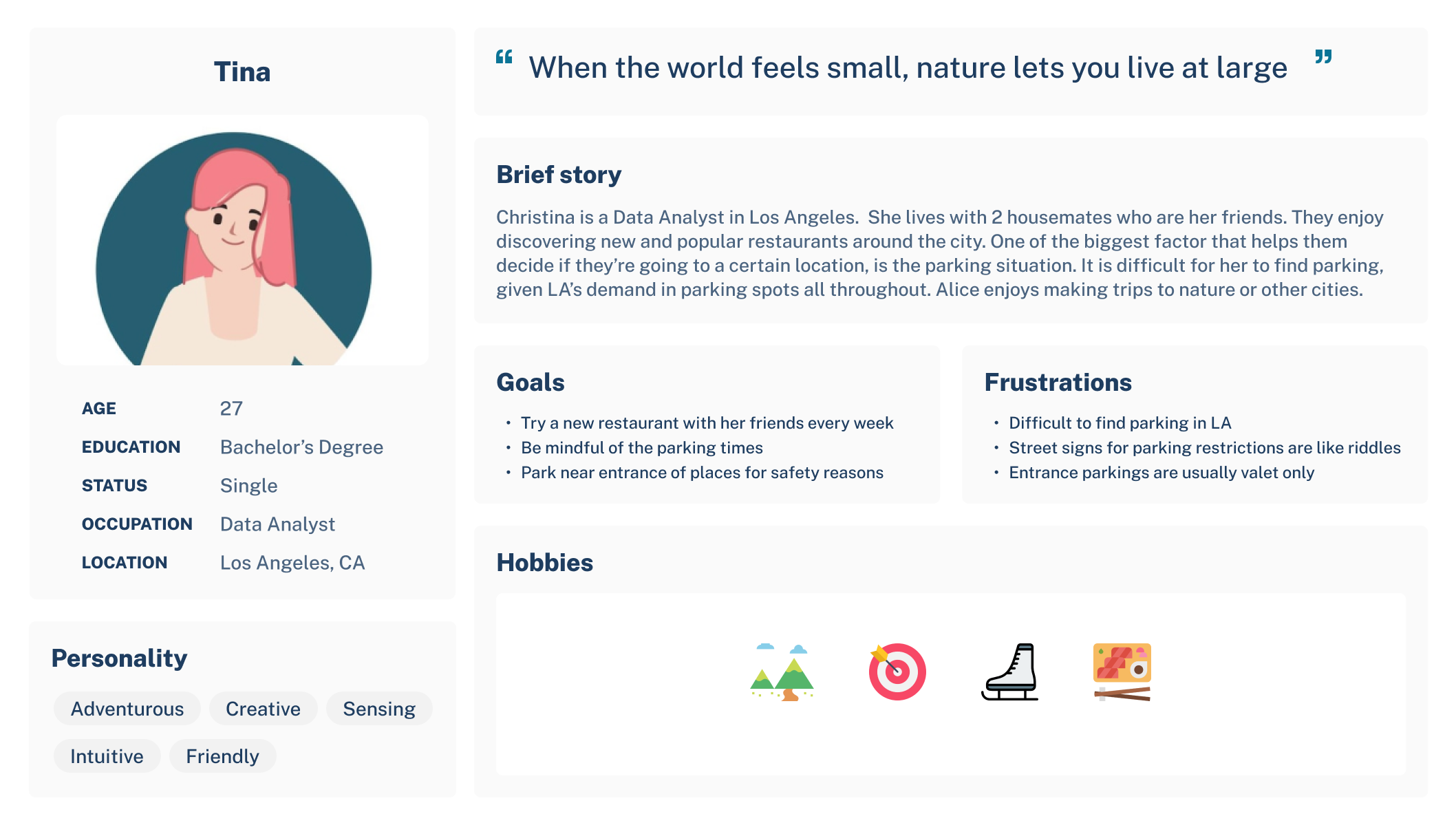
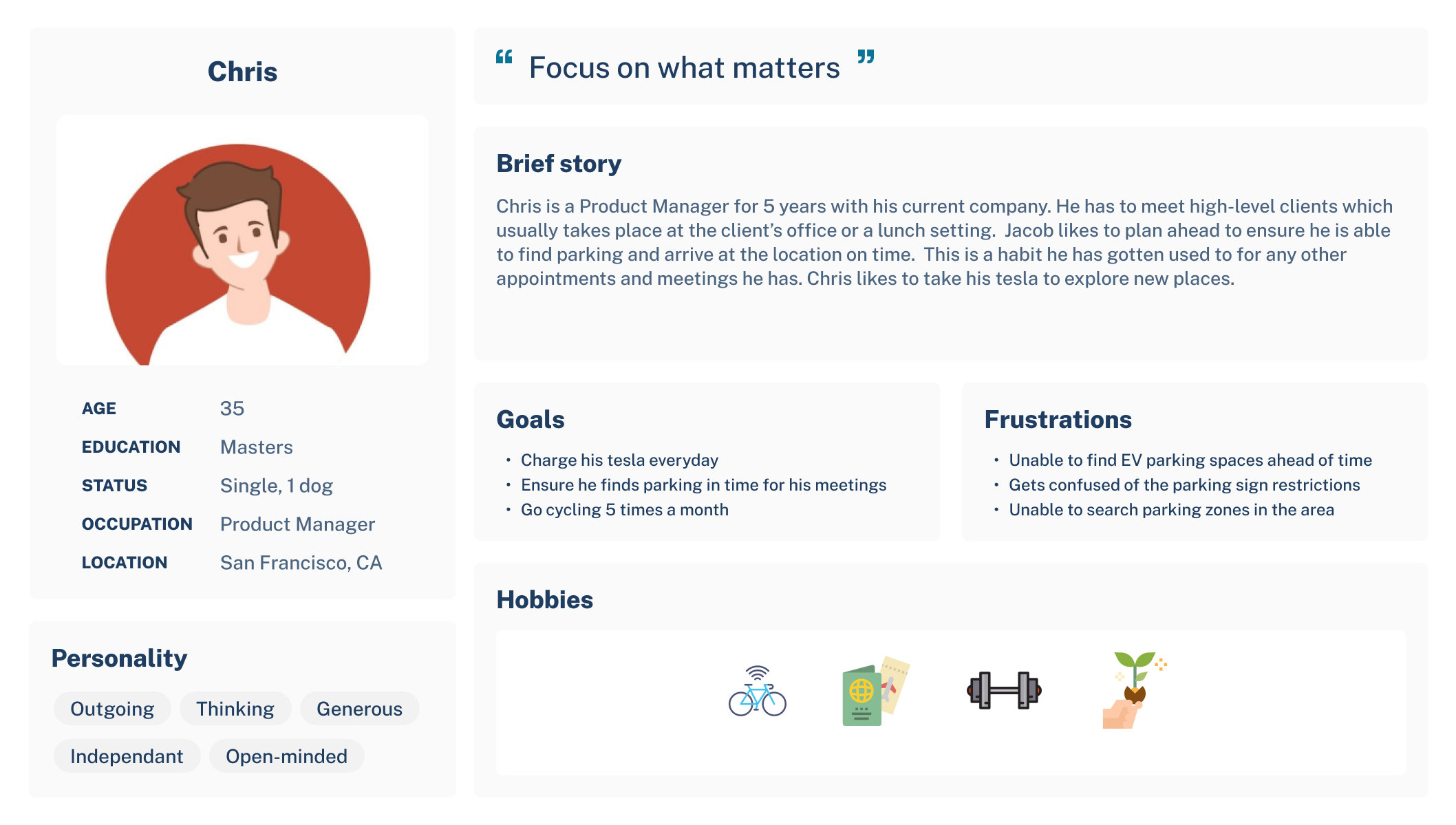
User Pain Points

As we look further, in both cases for Tina and Chris, they eventually would have found their parking. But, the concern for parking does not stop when they've made payment on the meter or the app. As they enjoy their activities, time passes and uh oh - their parking time is up and they now need to pay again! They can input the parking zone from the History, but what if they want to simply search the street to confirm the zone? Unfortunately, they simply can't.

Other reasons why "search" is beneficial

  • Simply forgot to pay
  • In a hurry and did not have time to identify zone and input payment for parking session
  • Unable to search if street is associated with Passport Parking beforehand
  • Unsure of the specific parking rules or if it has free parking
  • Wants to double-check if correct zone was inputted

Goal:

Add a "search zone" feature

Ideate

Flows & Sketches

Incorporating New Feature

Sitemap

The new added feature will be incorporated on the same level as "Enter Zone." This allows for the convenience of having the option to search if user does not know the zone number.
Dashboard mockup

Task Flows

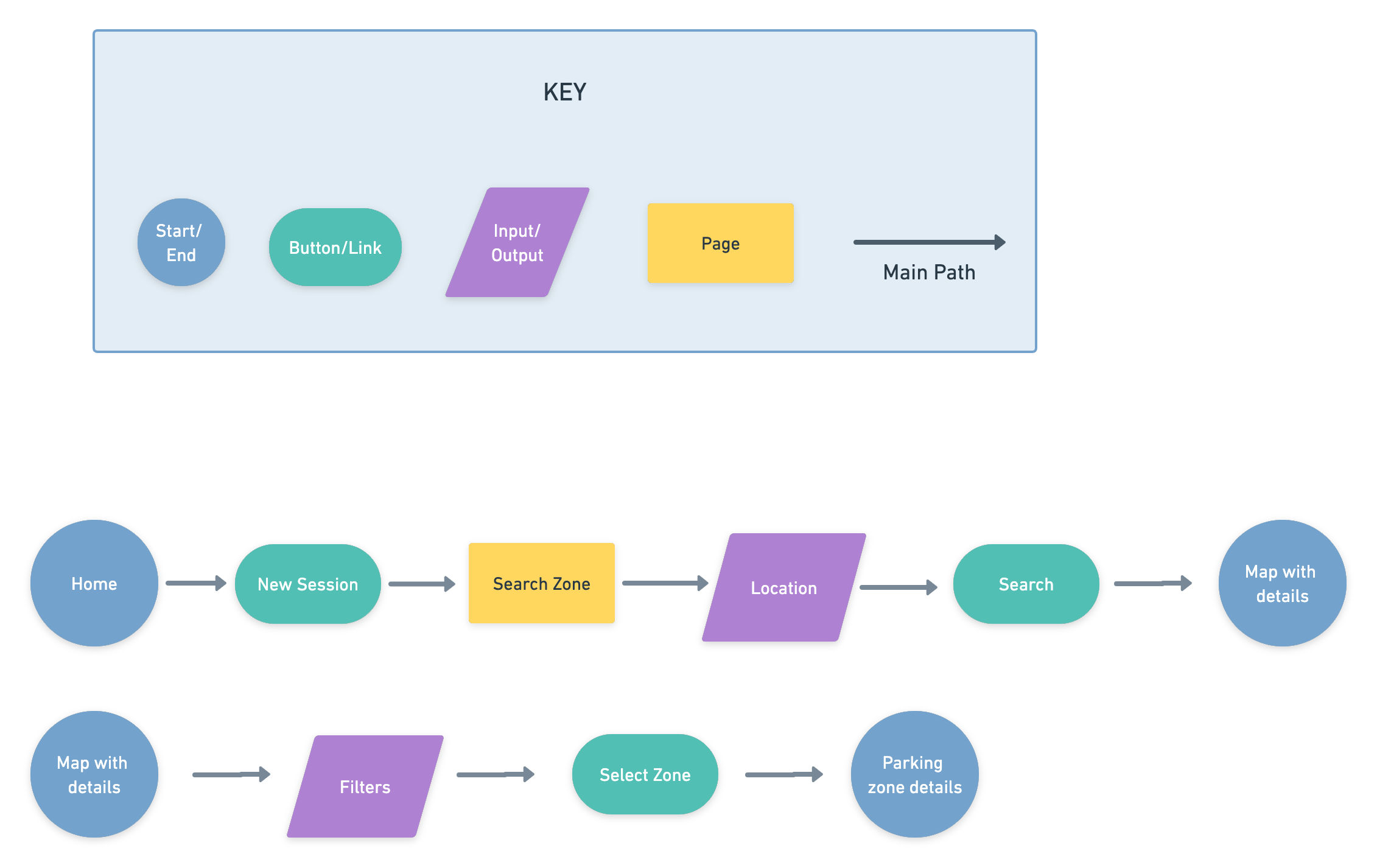
Following the flow within the existing application, there are 2 task flows that will get the user through the experience of the new feature. This includes the familiarity of showing a map view to view the street of where the zone is located along with parking details.
Dashboard mockup

Sketches

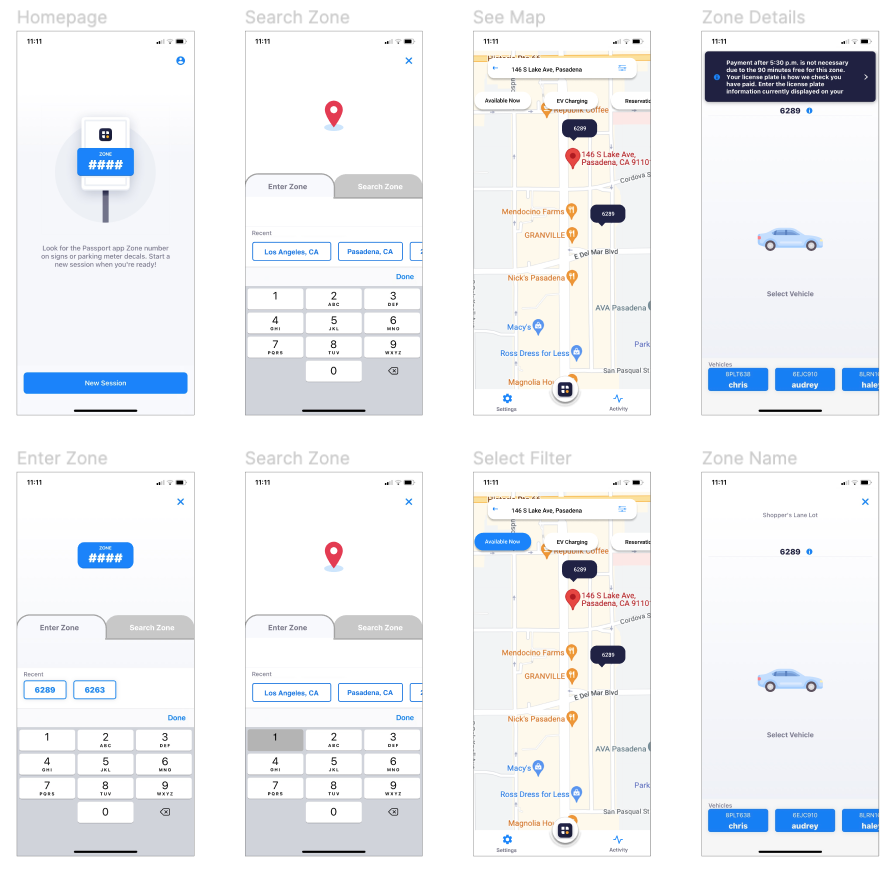
I started with the main screens to ideate for the screens that will follow. The homepage remained as is since the new feature would not appear yet. When creating a new session, users will then encounter the new feature. Next, the zone map is what will follow from the path of searching for the zone through the address. With the zone search, as a familiarity with other designs, there are filters for user to narrow down their search. In the sketch, the filters will pop-up as a separate page for a direct focus. These are the main screens to be explored in strengthening the new added feature.
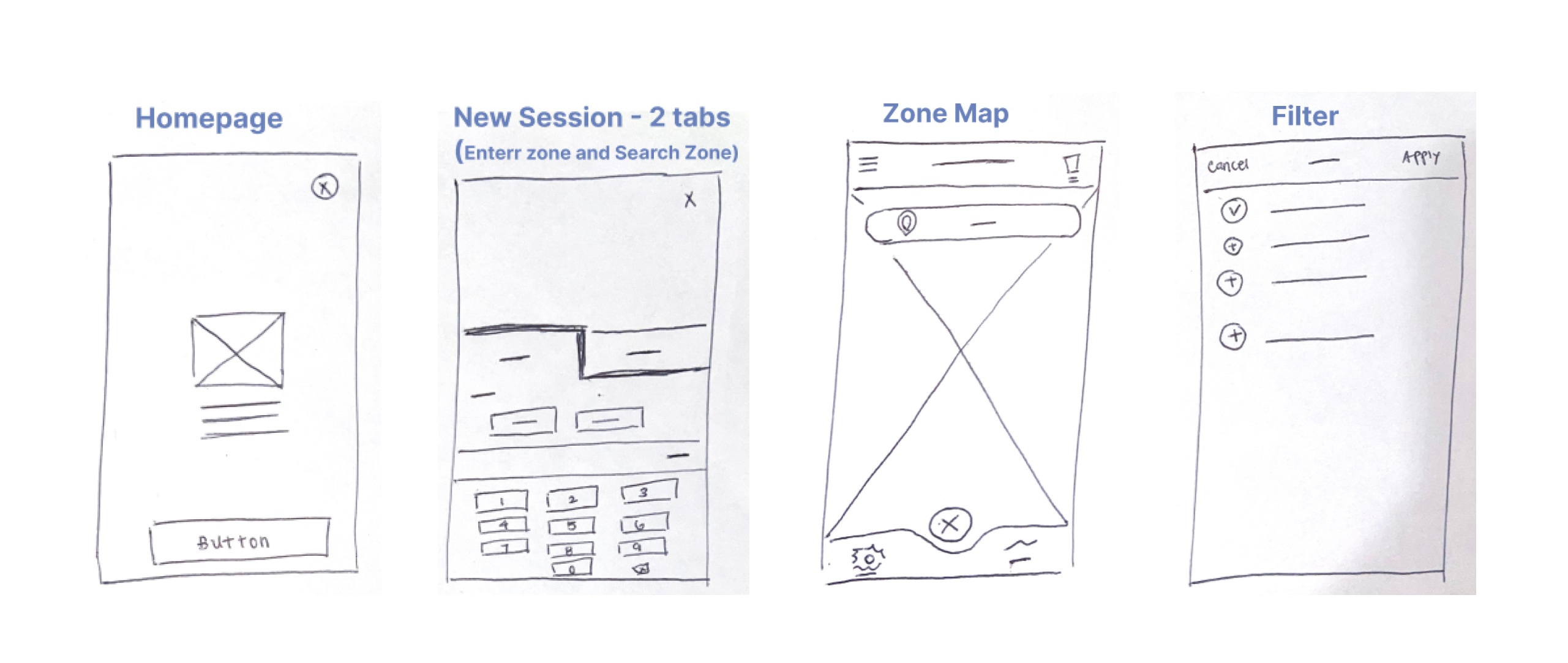
Highlights & Opportunities

  • Include icons
  • Consider filters on the zone map screen
  • Consider various types of filters - time, availability, EV

UI Design

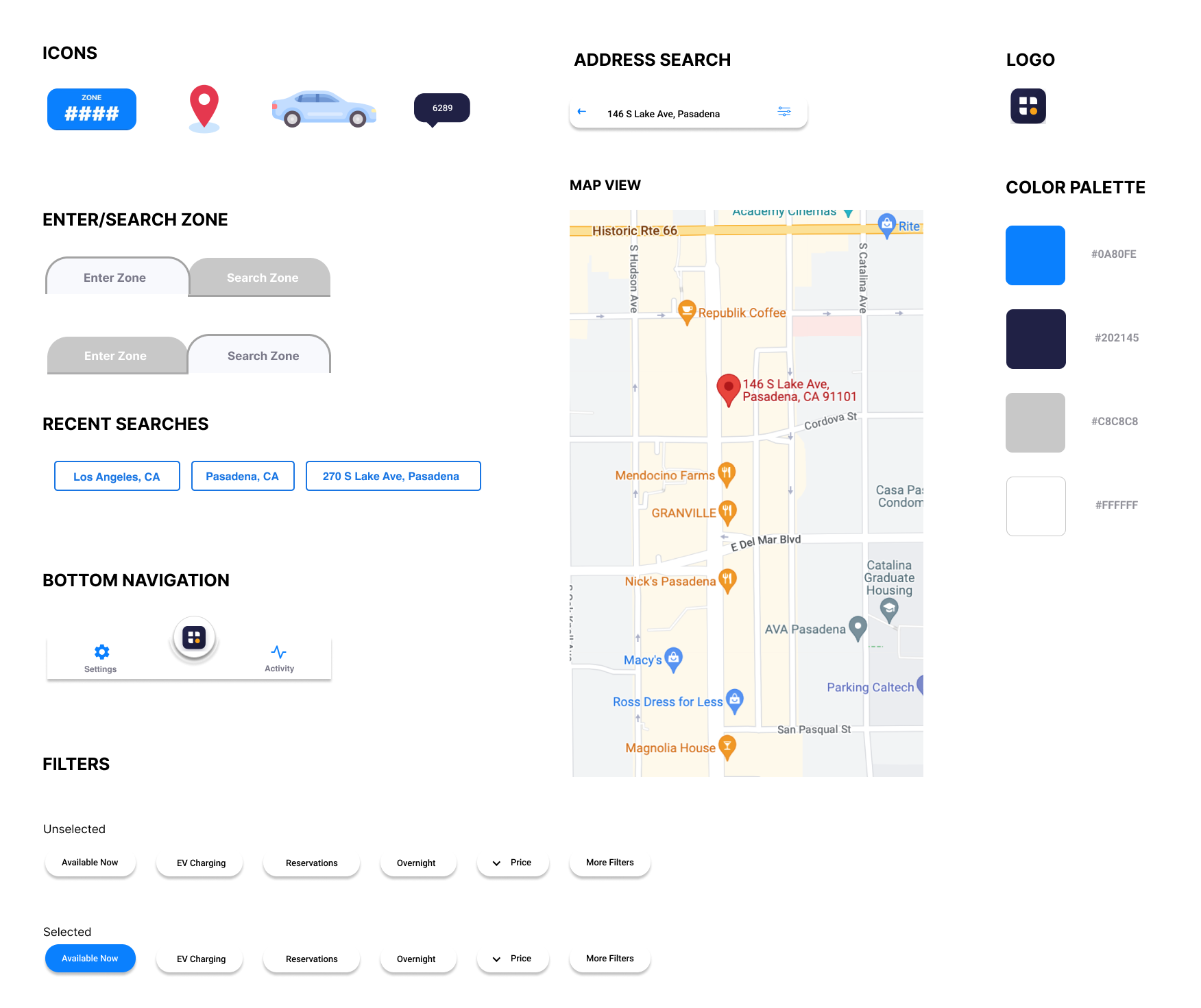
UI Kit

Enhancing the Brand

High-Fidelity Wireframes

The approach I took with this is simplicity. This is because the app itself exhibits a direct and intuitive design with little to no confusion on what the call-to-action buttons is. I designed in accordance to the app's effortless nature to maintain  originality and achieve a cohesive design throughout.

Test

Usability study

Identifying Challenges

The 5 participants taking part of the study are within LA County who own a car. This includes full-time and part-time workers and students. We can gauge the effectiveness and relevance of the feature to the direct intended audience. Participants each completed the study in the comfort of their home.

Duration

~15 minutes

Type

Unmoderated

Participants

5

Research Objective:

We’re adding a new feature in the app to help people search for the zone and location to find a parking spot associated with Passport Parking near them. Before launching, we need to figure out if searching for the parking zone is easy for users to do. We’d like to understand what specific challenges or needs users might face in the search process and how to resolve issues identified.

Research Goal:

Figure out if users can intuitively know where to navigate to search for a zone within the app.

Research Questions:

  • What can we learn from the steps that users take to search for a zone?
  • Are there any parts where users are getting stuck?
  • When and where do you think someone would use the app?

Results

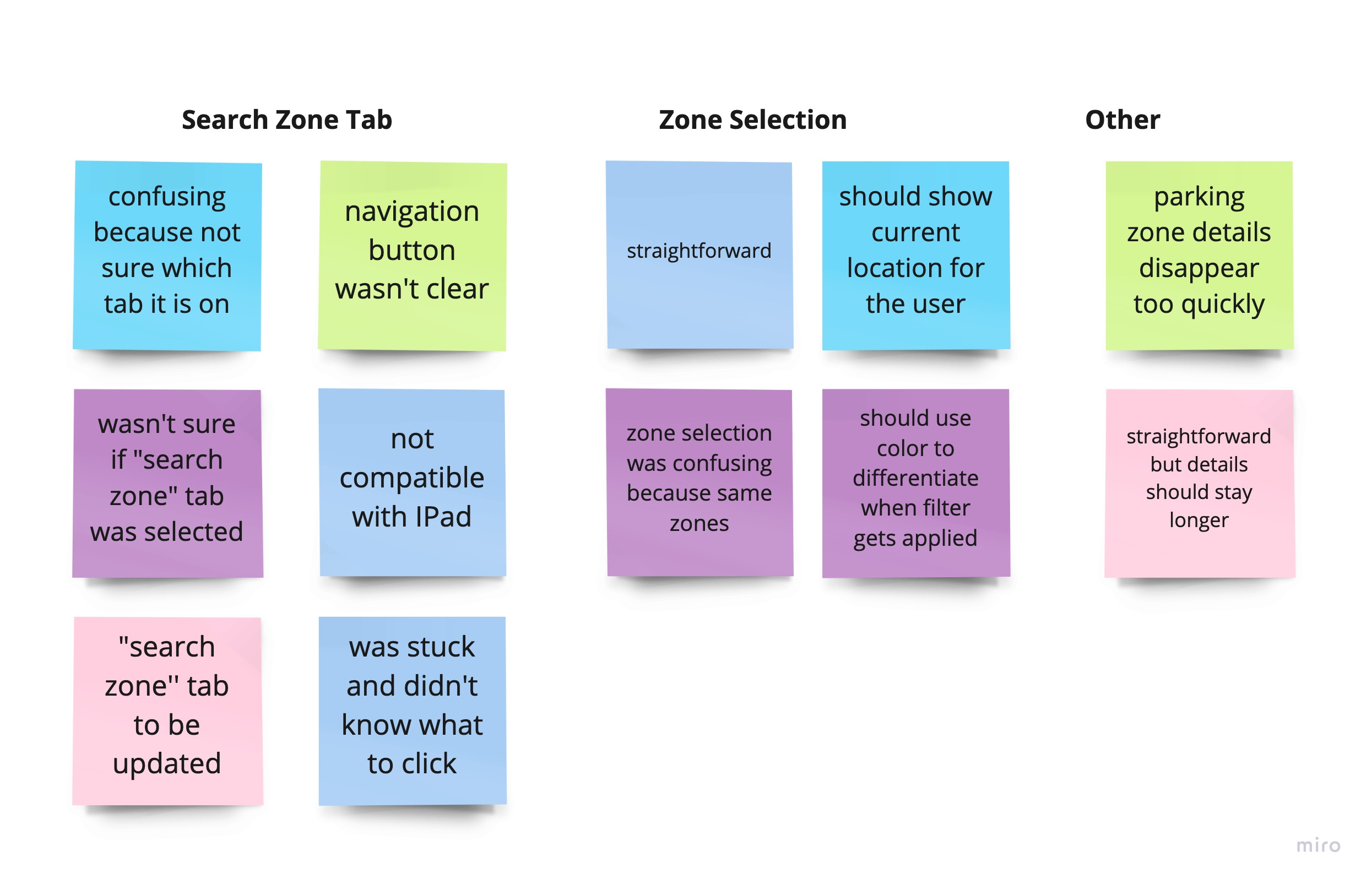
After conducting the study with the newly added feature, participants expressed confusion and inability to navigate to where they intended
Dashboard mockup

3/5

Participants found the "Search Zone" tab confusing

2/5

Participants found the map view needing additional details

2/5

Participants found the zone details disappear too quickly

Revisions

Dashboard mockup
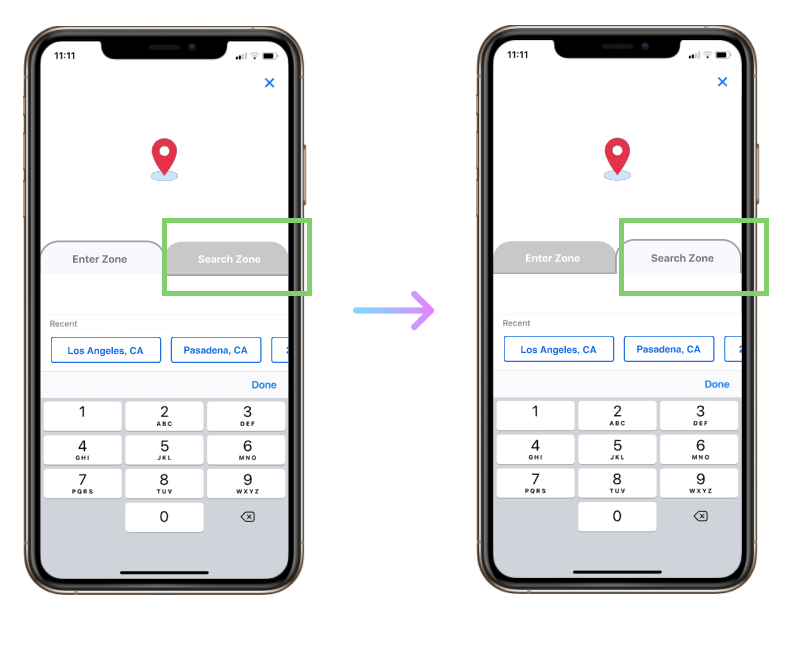
The tab for "Search Zone" is updated to acknowledge the navigation onto the tab from the "Enter Zone" tab.
Dashboard mockup
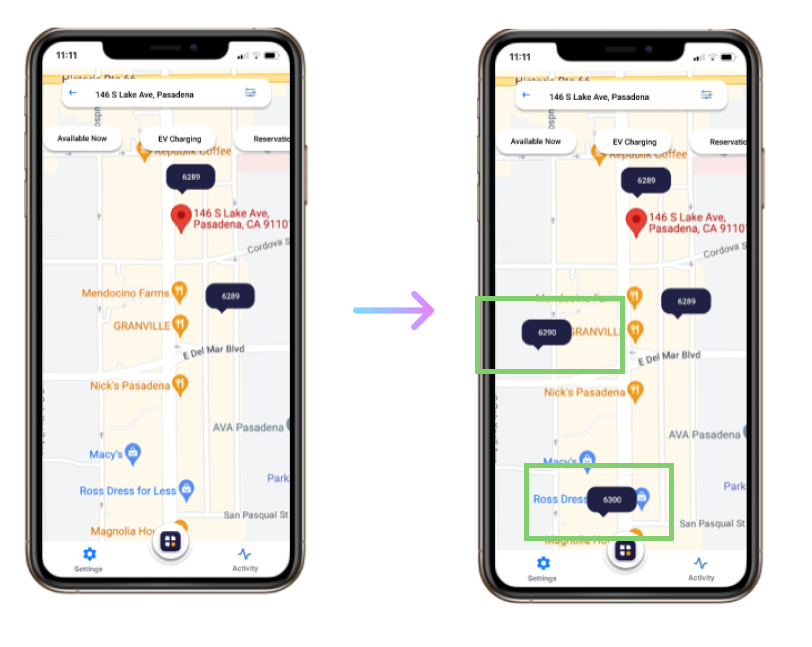
Proxy zones are added to show more zones so that when user filters "Available Now", only available zones will be displayed.
Dashboard mockup
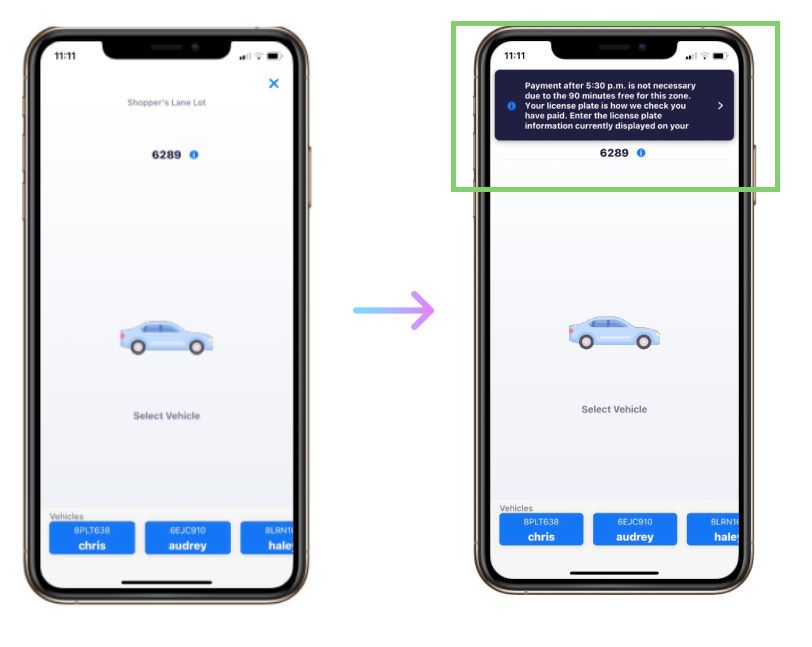
Zone details preview disappears too quickly. In the prototype, the preview will stay on for additional seconds and users will be able to view zone details when the cursor is hovered over the “Information” icon.

High-Fidelity Prototype With Added Feature

Final Prototype

Finishing Touches

Search for zone at 146 S Lake Ave
Select available zone closest to location

Reflection

In Closing

What I've Learned

Being Flexible

In creating for an existing app, the challenges I faced were both the limitations in being creative and consistency. For one, I felt restricted in how I wanted the components to appear. I had to be extra mindful of any additional colors to avoid clashing with the existing brand design. In addition, when adding pre-designed icons, since I can't adjust the colors according to the color palette, it took additional time to search and decide on one that will fit the brand visuals. Throughout the process, I have learned to be flexible and work within my limitations.

Inclusivity

It is by default that when I thought of parking, it is with gas vehicles. From the provisional personas created, I was reminded that as more electric vehicles cars are being produced, it is important to be inclusive of the market. Because of this, it was pertinent to not lose sight of my target audiences and provide them the resources of their respective needs.

Next Steps

Video Demo

Whether it is new or existing customers, there is always room for improving the usability for future users. It would be beneficial to add a demo video as guidance on how to use the app.

Location List

Add page where users can search location and list out associated parking zones in the surrounding area. Users will be able to zoom out and be better informed of their options.

Real-Time

Provide real-time availability to gauge occupancy of spots prior to arrival. This will inform users the busy times to aid in prior planning.

Thank you for your time in reading through this case study!